400+ Characters per Second: I Made Xiaomi's Local OCR Model 3x as Fast | Now Listed by the Official Team
Adapting Xiaomi-OCR-0 for local inference with NInfer, with performance tests on two GPUs, real-world OCR examples, and deployment instructions.
OCR is a very common part of legal work
The evidence or case files sent by the other side are scans, so searching the text is a pain. You need OCR
The papers and judgments you’ve downloaded are images and awkward to read. You need OCR
You want an LLM to read them without adding a separate VLM. You need OCR
Especially when reviewing criminal case files, confidentiality makes local OCR a must
As it happens, OCR models hit a sweet spot for running models locally: small parameter counts, modest hardware requirements, and decent speed
As it happens, model makers have also been competing on OCR models over the past few months
And as it happens, Xiaomi open-sourced an OCR model that, according to its evaluations, performs at an industry-leading level
And as it happens, again, an NVIDIA Blackwell-specific backend called Ninfer has been getting a lot of attention lately
So I did a little work
And made Xiaomi-OCR-0
3x as fast, with no loss in accuracy
* This article represents my personal views only and does not constitute legal advice.
1. Why Xiaomi-OCR-0?
SeerRay-Lab is Xiaomi’s open-source model lab. It has recently open-sourced several models, including Xiaomi-OCR-0
So why did I pick Xiaomi-OCR-0?
First, this isn’t sponsored
Second, mainly because of Xiaomi’s report: the model ranks pretty highly, especially its first-place result on Real5-OmniDocBench. That benchmark tests five conditions: scanning, page warping, photographing screens, lighting changes, and skew. That’s very close to what we deal with at work every day (why do so many people love photographing screens and taking crooked photos?)
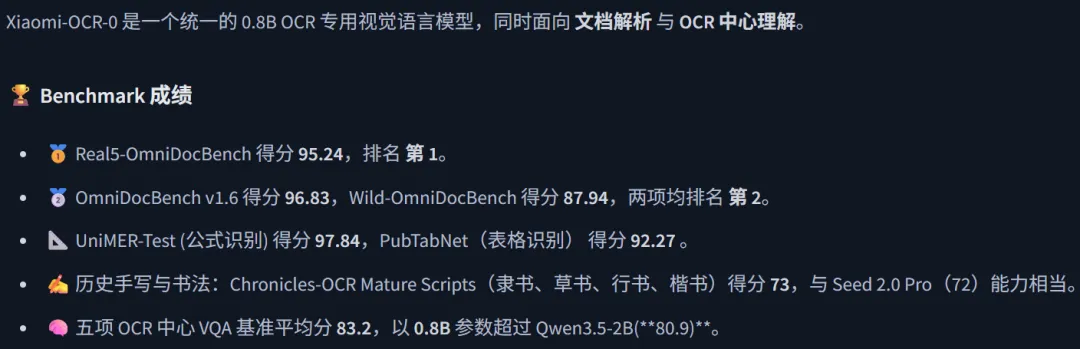
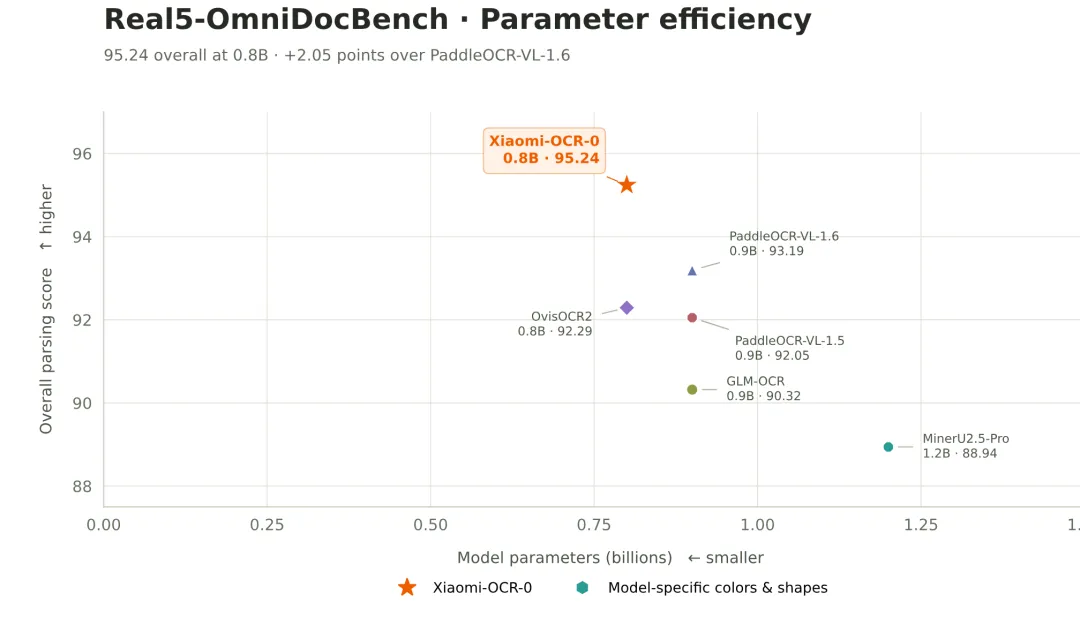
It supports document parsing, OCR-related question answering, and key information extraction. All very useful
It’s also post-trained from Qwen3.5-0.8B-Base. A small parameter count means fast inference and lower hardware requirements. And most importantly:
Qwen3.5!
2. Why Ninfer?
Ninfer is an inference backend specifically for NVIDIA Blackwell (commonly known as the 50 series) that’s been getting a lot of attention lately
Its standout feature is that it’s fast. Really fast
Much faster than ollama, llama.cpp, vLLM, or SGLang
The downside is that it currently only supports the Qwen family, officially supports only the 5090, and has limited support for just a few models
So for running Xiaomi-OCR-0, that means
No downsides
Compatibility?
As long as you’ve got tokens, compatibility isn’t a problem
3. Xiaomi-OCR-0-Ninfer in Practice
First, I converted Xiaomi’s official model to a Ninfer version
Then, because the official backend didn’t support Qwen 3.5, I did a little (okay, a lot of) tuning:
For example, I added support for the model’s computation shapes, gating operations, visual positional encoding, and Chinese tokenization
For example, I fused operations in the visual projection, bias, residual, and activation paths wherever possible to reduce intermediate reads and writes; adjusted the computation schedule for small-batch inference; and used CUDA Graph to reduce the overhead of repeatedly launching computations. During fusion, I also preserved the necessary rounding steps and ran numerical checks, so the pursuit of speed wouldn’t quietly change the results
For example, I adapted chunked processing for the stage that reads images and prompts, and so on
And successfully got the model running in my Ninfer Extended version
The final optimization results
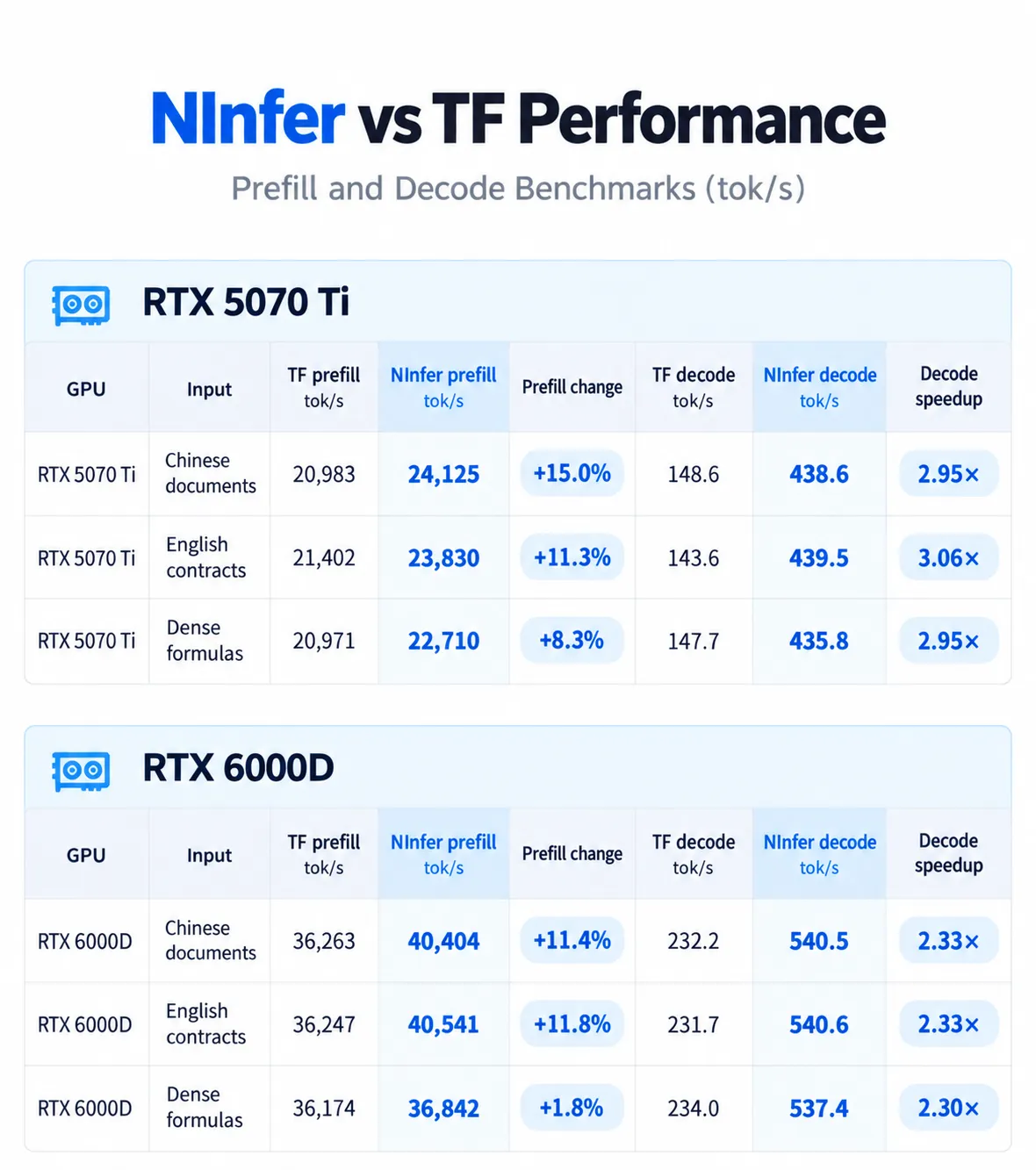
* TF = running the original BF16 model with Transformers
While running up to 3x as fast, accuracy is exactly the same, with no differences from the original BF16 model
| GPU | Transformers Character Accuracy | NInfer Character Accuracy | Exact Raw Output Match Rate | Character Difference Rate |
|---|---|---|---|---|
| RTX 5070 Ti | 100% (CER 0%) | 100% (CER 0%) | 3/3 (100%) | 0% |
| RTX 6000D | 100% (CER 0%) | 100% (CER 0%) | 3/3 (100%) | 0% |
If that still feels a little abstract, here are some real-world tests
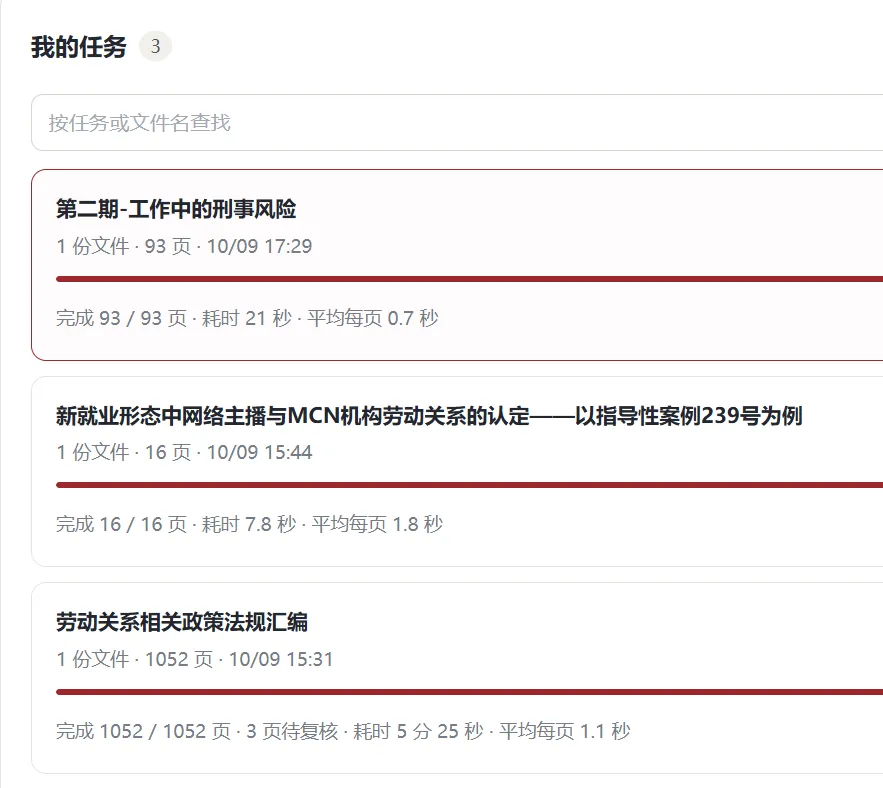
PowerPoint transcription: an average of 0.7 seconds per page
Paper transcription: an average of 1.8 seconds per page
Legal compilation: an average of 1.1 seconds per page
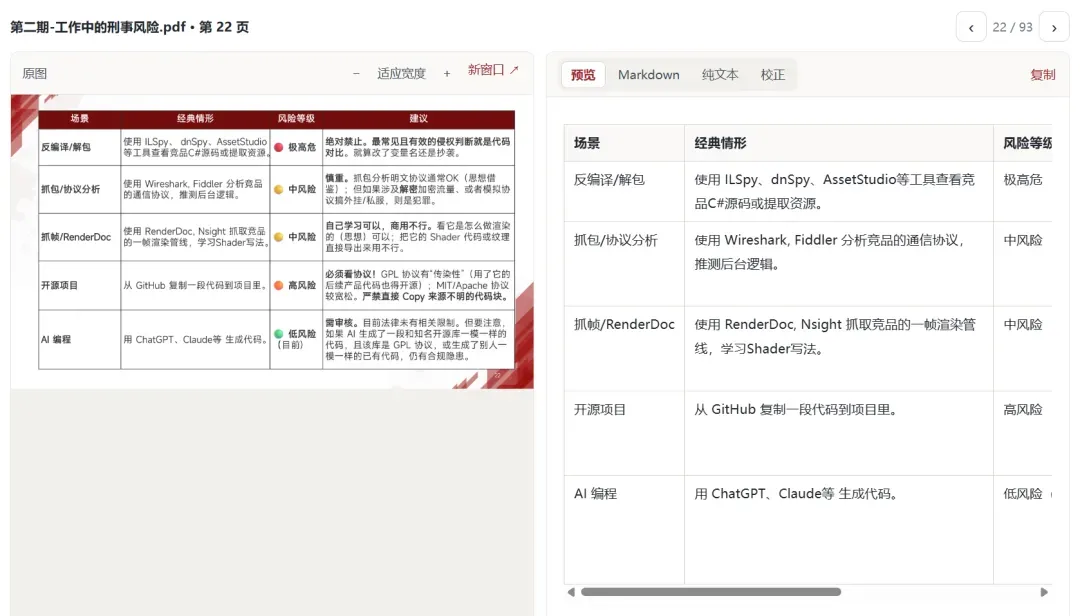
Tables: recognized and output correctly
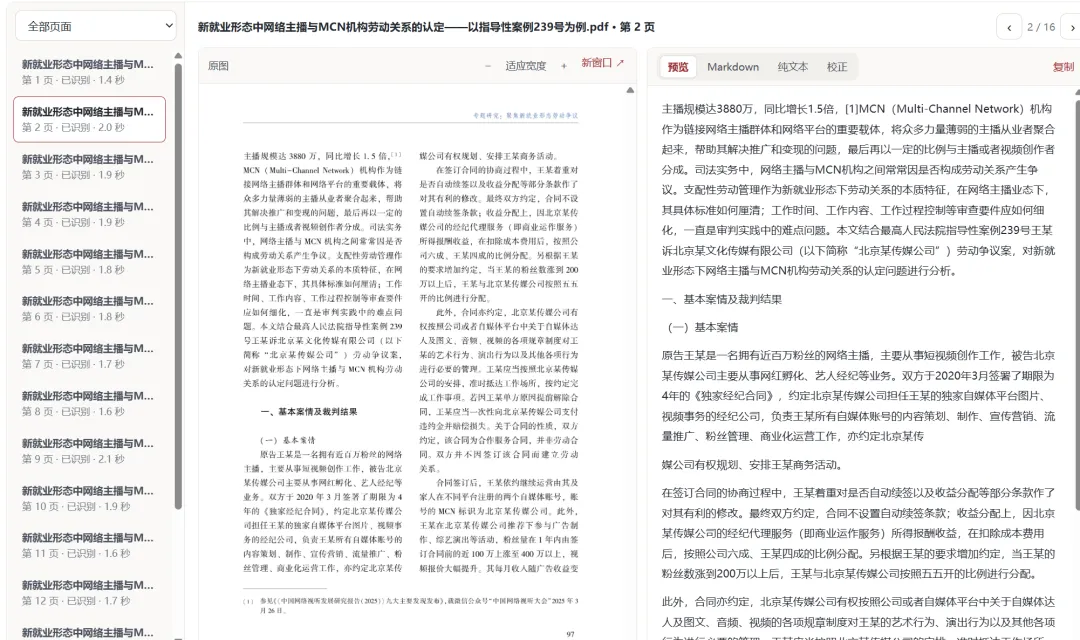
1,126 characters across two columns, correctly parsed and output in 2 seconds
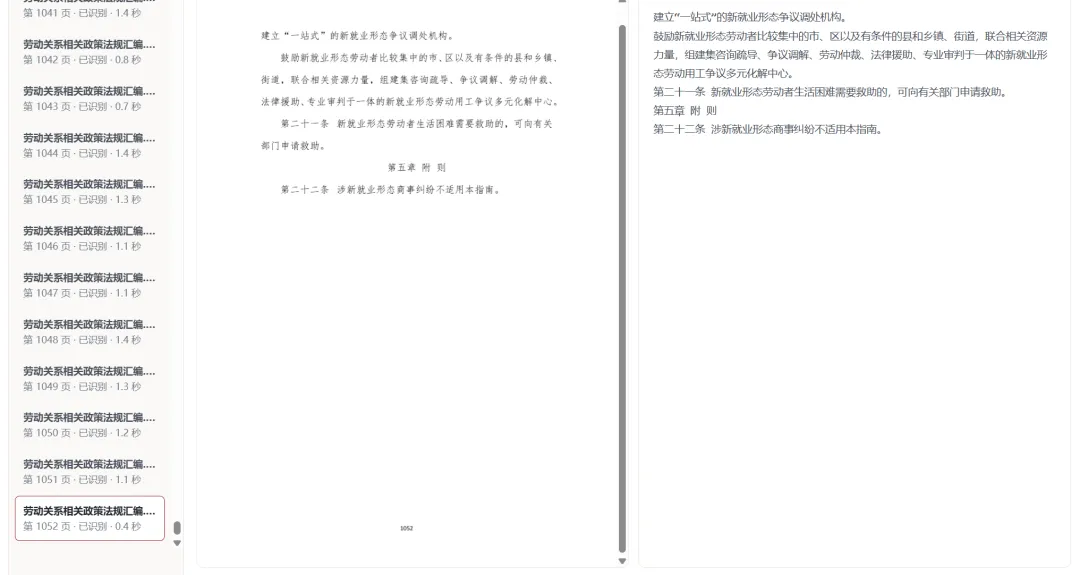
A 1,052-page legal compilation, finished in under 5 and a half minutes
That’s basically enough for my day-to-day work
4. How Do You Use Xiaomi-OCR-0-Ninfer?
If you have a 50-series GPU, just send this to your agent
Please help me deploy the ByronLeeee/Xiaomi-OCR-0-Ninfer model locally. Follow the documentation on its ModelScope page to build it, and adapt and optimize the operators for my existing hardware.
So far, I’ve completed adaptation and optimization for the 5070 Ti and 6000D
If you’re using another GPU, especially if you’re on a Mac, you’ll probably need to handle the adaptation and optimization yourself
(Note: the WebUI tool shown above isn’t included in the repository. This release only includes the model and inference backend)
5. Finally
Thanks to Xiaomi’s official team for listing my version
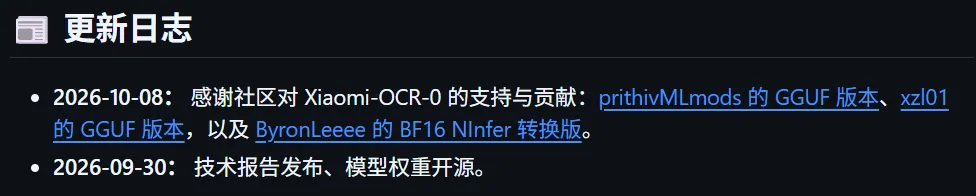
Personally
Compared with all the various front-end apps
Real, measurable improvements are still more exciting
Now I’m just waiting for Qwen4-27B

Cite this article
Boyang Li, "400+ Characters per Second: I Made Xiaomi's Local OCR Model 3x as Fast | Now Listed by the Official Team," Boyang Li (lslby.com), October 9, 2026, https://www.lslby.com/en/research/xiaomi-ocr-ninfer-local-speedup/