LONG AN (GUANGZHOU) AI TRAINING II · PART TWO
PART TWO · PRACTICAL AGENT SKILLS

AGENTS ARE EASIER
THAN THEY LOOK

Practical Skills and reusable workflows for getting more from an agent—then turning the result into a polished HTML presentation.

022026 · 09 · 02
Li Boyang, Attorney-at-Law14:30 | 46/F, Tower A, Victory Plaza, Tianhe, Guangzhou
PART TWO · PRACTICAL AGENT SKILLS

Li BoyangSENIOR PARTNER

Long An Law Firm (Guangzhou)
Director, Long An Greater Bay Area AI Legal Research Center

  • FOCUSAI and algorithm governance, data compliance, IP, and internet disputes
  • WORKLLMs, agents, legal knowledge bases, and electronic evidence processing
  • OUTPUTCo-author, A Legal Professional's Guide to ChatGPT · Creator of WordOllama

Over a decade of internet-law practice

Portrait of Li BoyangLI BOYANG
PART TWO · FOUR PRACTICAL MOVES

Four practical moves
take an agent from answers to deliverables.

01Skills

grill-me, UI UX Pro Max, and a Skill of your own.

02MCP

Let an agent query statutes through a defined interface.

03Agent workflows

Plan, Goal, workspaces, and model selection.

04HTML, not PPT

HTML may be the better presentation format.

SKILLS · A SHORTLIST

Two Skills for recurring problems

Then build one that captures your own method.

01

grill-me

Continuous questioning helps the model understand the real brief—not merely guess at your wish.

Best for: solution design and major project kickoffs
02

UI UX Pro Max

Move beyond an agent's bland default visual taste.

Best for: websites, posters, and HTML decks
03

Build your own Skill

How can an agent help package your expertise?

Best for: turning personal experience and team standards into repeatable workflows
Skill 01 · grill-me

Before work begins,
let it question you relentlessly

AI fills gaps in a vague brief with assumptions. grill-me follows every branch until you and the model agree on the objective, inputs, boundaries, and acceptance criteria.

A little alignment up front saves a great deal of revision later.

GOALWhat must be completed?
AUDIENCEWho is it for, and how should it sound?
BOUNDARYWhat is required—and what is out?
STANDARDWhat makes it ready to deliver?
Skill 02 · UI UX Pro Max
HIERARCHYSPACE

“Make it look
more premium” is not a brief

PURPOSEEscape the model's default purple palette
ADAPTATIONThe Skill selects patterns to fit the subject matter
STYLE CUE“Closer to Apple's website”
YOUR SYSTEM FIRSTDefine your theme, then let the agent adapt within it
SKILL 03 · BUILD YOUR OWN

Distill the voice of Ye Junxi

Turn the writing habits in Attorney Ye's past WeChat articles into a writing Skill an agent can invoke directly.

APPLY A MODEL-TRAINING MINDSET
Training set 6

Let the agent extract a first set of writing rules from six articles.

Validation set 4

Then compare outputs against four held-out articles, one at a time, and revise the rules.

YE JUNXI WECHAT VOICE · SKILL.md

  1. Topic selection and angle
  2. Headlines and opening patterns
  3. Structure and legal reasoning
  4. Word choice, tone, and banned phrases
  5. Final self-review checklist
Learn from 6Draft rulesValidate on 4Revise and finalize

Do not generate it in one pass. Draft, validate article by article, and write each observed deviation back into the Skill. Iteration is the better method.

SKILL · VALIDATE IT

Does the Skill work?
Let the author himself judge.

The better approach: revise it with a human, then iterate again.
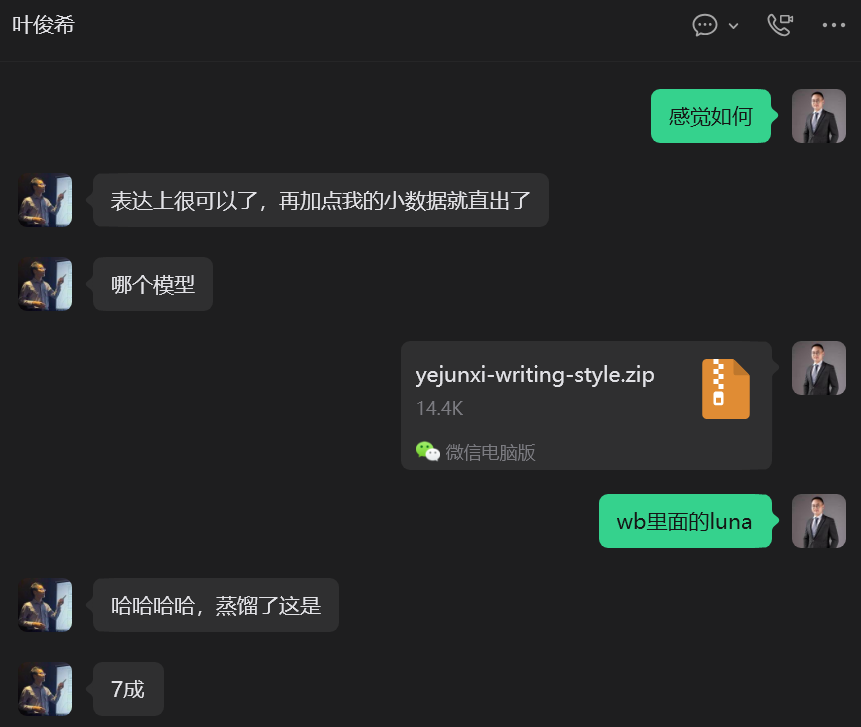
Internal screenshot of Attorney Ye Junxi's feedback on the writing Skill
MCP · MANY LEGAL TOOLS, ONE CONNECTION

Connect MetaLaw MCP
and give an agent access to multiple legal datasets

MetaLaw MCPTurns legal data interfaces into tools an agent can call
Legislation

Statutes, validity status, effective dates, and sources.

Cases

Case and judgment searches to support research and argument.

Companies

Registration, shareholders, IP, litigation, enforcement, and notices.

Securities

Regulatory cases, listed-company disclosures, and securities rules.

PLUS:Check citations to legislation, provisions, and case numbers to help detect legal hallucinations.

Other options include PKULaw MCP and Faxin MCP.

MCP · THE SMALLEST VERIFIABLE TASK

One request
returns the statute and cases

Use MetaLaw MCP to retrieve Article 577 of the Civil Code of the People's Republic of China and provide relevant cases.
WORKFLOW · PLAN

Plan mode: think before acting

Execute directly

When the instruction is clear, risk is low, and the path is known, execution is faster.

  • Rename files in bulk
  • Clean an existing spreadsheet
  • Generate a standard document from a template
Action: state the requirement and proceed

Plan first

When there are many steps, broad impact, or an unclear prompt, map the approach, risks, and open questions first.

  • Design a case-material workflow
  • Conduct in-depth research
  • Create an important presentation
Action: open the mode menu and choose Plan
WORKFLOW · GOAL

Goal mode gives long-running work a clear finish line

01Define the final outcome
02AI divides the work into stages
03Keep moving across turns
04Validate each stage
05Close out on completion

BEST FOR: Multi-turn, multi-file work that needs sustained follow-through.

RISK: Repeated context compression can cause drift; human constraints remain necessary.

WORKFLOW · TWO CHOICES

How to scope the workspace

KEEP IT SMALLOne case, project, or deliverable type per workspace.
MAKE IT REVERSIBLEPut deliverables in outputs and retain version history for important edits.
BACK UP FIRSTBack up original evidence and final legal documents before agent processing.

How to choose a model

SMALL, LOW-COSTFormat conversion, bulk organization, and repetitive operations.
BALANCEDEveryday file work, tool calls, and multi-step deliverables.
FRONTIERComplex reasoning, long-document review, and extended multi-file workflows.
WORKFLOW · A REUSABLE BRIEF

A useful task brief makes four things clear

01GOALThe problem to solve and the final outcome to deliver.
02INPUTSWhere the information lives, which files matter first, and what to ask if missing. Mention project files directly.
03STANDARDStructure, terminology, citations, risks, and facts that must never be guessed. Add manual rules or Skills where needed.
04DELIVERYFormat, filename, save location, and acceptance checklist.

Useful phrase: “Draft a plan from my requirements first. Ask me about anything that is not yet clear.”

HTML PRESENTATIONS · THE OPENING LINE
“Create an HTML presentation
about [XXX].”

HTML supports instant preview, motion, inline SVG icons, and automated screenshot-based QA by the agent.

HTML PRESENTATIONS · MAKE TASTE SPECIFIC

Do not merely say
“make it look good”

#B4202A#1C1A17#6B7A44#C68642

Do not just ask for “red, black, green, and blue.” Specify color values in HEX.

LAYOUT16:9 full screen; large titles; ample space; few cards
TYPESpecify title and body fonts, plus system fallbacks
ICONSPrefer inline SVG; avoid emoji and random 3D art
MOTIONUse gentle transitions and staged reveals; no shaking or light sweeps
CONTROLSKeyboard navigation, slide count, progress, and fullscreen
QACapture at 1920×1080 and 1440×900; fix overflow
HTML PRESENTATIONS · COPY AND ADAPT

State the topic, style,
audience, content, and design
in one clear brief

Let the agent read existing materials and brand rules, confirm the structure, build the deck, and then inspect screenshots automatically.

Create an English-language HTML presentation about [XXX]. Audience: XXX. Setting: XXX. Keep it within XX slides. Read the current workspace materials first, propose the slide structure, and wait for confirmation before building. Visual direction: 16:9 fullscreen, editorial composition, large titles, and ample negative space. Avoid red and blue. Use #F6F1E7 for the background, #1C1A17 for body text, #6B7A44 as the primary accent, and #C68642 as the secondary accent. Use Georgia for titles and MiSans for body copy, with system fallbacks. Use inline SVG icons. Add subtle slide transitions and staged process reveals. Avoid shaking, light sweeps, shadows, and meaningless 3D decoration. Support keyboard navigation, slide numbers, global progress, and fullscreen. When finished, capture every slide at 1920×1080 and 1440×900. Check text overflow, awkward wrapping, image crops, and alignment before delivering the final HTML.
DISCUSSION · QUESTIONS TO TAKE FORWARD
Q

Are you using an agent?
Let us talk about the real work.

01Are you using an agent today? What do you use it for?
02What is the biggest problem you have encountered?
03Which part of legal work would you most like an agent to take on?
04What remains unclear about Skills, MCP, Plan, or Goal?
05Is there a real task we should break down together now?